
TNOU Prospectus 2026-27: PDF Download and Session Archives
Part of TNOU Admission: TNOU Admission 2026: Online Portal, Course Eligibility and Fee Structure
Quick reference
| Latest Prospectus Release | CY 2027 B.Ed. Special Education Prospectus |
|---|---|
| Release Date | 04 November 2026 |
| Official Main Website | tnou.ac.in |
| Official e-Portal | tnouportal.in |
| Admission Contact Mobile | 9345913378 |
| Admission Contact Email | admission@tnou.ac.in |
TNOU published the admission notification and prospectus for the CY 2027 B.Ed. Special Education session on 04 November 2026. Distance learners can access session prospectuses from AY 2021–22 through AY 2026–27 on the official site and complete admission procedures on the student e-portal.
- TNOU released the CY 2027 B.Ed. Special Education admission notification and prospectus on 04 November 2026.
- Session prospectuses from AY 2021–22 up to AY 2026–27 are available on the TNOU website.
- All online admission and registration procedures take place on the e-portal at tnouportal.in.
- Learners submit scanned assignment PDFs under 5 MB via the student portal.
Tamil Nadu Open University, also known as TNOU, offers distance education programmes across Tamil Nadu. Candidates planning to enroll for the Academic Year 2026–27 or Calendar Year 2027 sessions can download official prospectus PDFs directly from the university main website. The prospectus provides comprehensive information regarding academic programmes, admission procedures, online assignment policies, and student support services.
TNOU Prospectus 2026: CY 2027 B.Ed. Special Education Notice
Tamil Nadu Open University published the CY 2027 B.Ed. Special Education Admission Notification and Prospectus on 04 November 2026. Prospective candidates seeking entry into special education distance programmes must review this release on the university portal.
Candidates must strictly utilize the university website and e-portal for verifying admission notifications and submitting application forms. Official notifications provide updated instructions for registration and academic requirements.
TNOU Prospectus 2026: Session Prospectus Downloads
Tamil Nadu Open University maintains official prospectus PDFs for multiple academic and calendar year sessions on its portal. Candidates can view fee structures, academic regulations, and programme details across past and current admission cycles.
Prospectus downloads covering academic sessions from AY 2021–22 up to AY 2026–27 are available for student reference.
TNOU Prospectus PDF Archives Available on Site
| Session Name | Document Title | Official Portal Link |
|---|---|---|
| CY 2027 | CY 2027 B.Ed. Special Education Admission Notification and Prospectus | tnou.ac.in |
| AY 2026–27 | PROSPECTUS-(AY 2026-27) | tnou.ac.in |
| CY 2026 | PROSPECTUS-(CY 2026) | tnou.ac.in |
| AY 2025–26 | PROSPECTUS-(AY 2025–26) | tnou.ac.in |
| AY 2024–25 | PROSPECTUS-(AY 2024–25) | tnou.ac.in |
| AY 2023–24 | PROSPECTUS-(AY 2023–24) | tnou.ac.in |
| AY 2022–23 | PROSPECTUS-(AY 2022–23) | tnou.ac.in |
| AY 2021–22 | PROSPECTUS-(AY 2021–22) | tnou.ac.in |


TNOU Prospectus 2026: Portals and Institutional Details
Tamil Nadu Open University operates automated portals to manage student admissions, re-registrations, and assignment submissions. Distance learners use these platforms to perform academic activities and manage enrolment details securely.
Institutional accreditation and official contact address details are outlined on university portals for student reference.
TNOU Key Institutional Facts and Portals
| Feature | Official Details |
|---|---|
| NAAC Grade | NAAC ‘A+’ Grade with CGPA 3.32 (Cycle – 1) |
| UGC Status | Recognised by UGC-DEB, Accorded 12(B) status by UGC |
| Headquarters Address | No 577, Anna Salai, Saidapet, Chennai – 600 015 |
| Main Website | tnou.ac.in |
| Student e-Portal | tnouportal.in |

More from TNOU
TNOU Prospectus 2026: Steps to Download and Apply Online
Candidates can download the prospectus PDF and complete online admission forms directly through the TNOU web pages. Following systematic steps helps applicants select the correct session document and complete registration smoothly.
TNOU has not published separate offline application fees on the prospectus page as of 04 November 2026.
- Go to the official TNOU Prospectus and Fee Structure page.
- Click on the desired session link, such as PROSPECTUS-(AY 2026-27) or the CY 2027 B.Ed. Special Education notification.
- Save the prospectus PDF file to inspect eligibility, fee details, and academic guidelines.
- Navigate to the TNOU Student Portal Login to access admission and re-registration forms.
- Select Student, enter your User Id or Enrolment Number and Password, then click Submit to proceed with your application.
TNOU Prospectus 2026: Online Assignment Upload Rules
Tamil Nadu Open University conducts assignment workflows online from question paper download to mark awarding. Distance learners must submit assignment files through the designated portal within prescribed deadlines.
Assignments must meet specific file format and size requirements before submission.
- Access the student portal login page at TNOU Student Portal Login.
- Click on Online Assignments and log in using a valid enrolment number.
- Click Search to display all assigned courses, or search by course name, year, or semester.
- Click Download to obtain the assignment question paper PDF.
- Prepare the assignment answers and click Upload to open the file selection screen.
- Click Choose file to select a scanned PDF file under 5 MB size and click Submit.
- Use the Reupload button before the due date if any content corrections are required.
TNOU Prospectus 2026: Helplines and Division Contact Details
TNOU provides dedicated contact divisions for student support, admissions, examinations, and study material distribution. Students facing technical or academic issues can reach out via phone, email, or WhatsApp.
Help desk services operate from 8.00 a.m. to 8.00 p.m. on working days at the Chennai administrative block.
- Admission Section: 044-24306663, mobile 9345913378, email admission@tnou.ac.in
- Student Support Services Division (SSSD): 044-24306627, mobile 9345913376, email sssd@tnou.ac.in
- Examination Section: 044-24306662, email exam@tnou.ac.in
- Certificate Section: 044-24306665, email certificate@tnou.ac.in
- Material Production & Distribution Division (MPDD): 044-24350844, mobile 9345913377, email mpdd@tnou.ac.in
- Student Grievance Redressal Cell: mobile 9345913384, email grievancecell@tnou.ac.in
- WhatsApp Admission Support: 9345913378
TNOU Prospectus 2026: Action Plan for Prospective Applicants
Candidates aiming to apply for current sessions should download the PROSPECTUS-(AY 2026-27) or the CY 2027 B.Ed. Special Education prospectus released on 04 November 2026. Review all course conditions on the portal and complete online registration promptly.
For additional guidance on login credentials or admissions, contact the TNOU admission helpline directly.
Important TNOU links
| What you can do | Official page |
|---|---|
| Download session prospectuses and fee structures | tnou.ac.in ↗ |
| Access TNOU student portal login | tnouportal.in ↗ |
| View TNOU help desk contact information | tnou.ac.in ↗ |
| Find official section contact numbers | tnou.ac.in ↗ |
What students ask about TNOU Prospectus
Where can candidates download the tnou prospectus 2026?
Candidates can download the TNOU prospectus for AY 2026-27 and the CY 2027 B.Ed. Special Education notification directly from tnou.ac.in. The CY 2027 B.Ed. Special Education prospectus was uploaded on 04 November 2026. To access, navigate to the “Prospectus and Fee Structure” section on the main website and click the relevant session link. If you face issues, ensure you are on the official tnou.ac.in site.
How to get the tamil nadu open university distance education prospectus?
The Tamil Nadu Open University distance education prospectus is available for download on the official website, tnou.ac.in. To obtain it, visit the site, locate the “Prospectus and Fee Structure” section, and click on the specific session link, such as PROSPECTUS-(AY 2026-27). This will allow you to download the PDF file directly. For any issues with downloading, verify the URL is tnou.ac.in.
Is the tnou prospectus 2025 still available for download?
Yes, the TNOU prospectus for AY 2025–26 is still available for download from the university’s main website, tnou.ac.in. TNOU maintains an archive of session prospectuses from AY 2021–22 up to AY 2026–27. To access it, navigate to the “Prospectus and Fee Structure” section and select the PROSPECTUS-(AY 2025–26) link. All archived prospectuses are available free of charge in PDF format.
Where to find the tamil nadu open university distance education prospectus 2024?
The tamil nadu open university distance education prospectus 2024 is listed on tnou.ac.in under PROSPECTUS-(AY 2024–25). Students can open the Prospectus and Fee Structure menu to view archive links from AY 2021–22 through AY 2026–27. Files can be saved directly from the portal.
Can students download the tnou prospectus 2021 pdf?
Yes, students can download the TNOU prospectus for AY 2021–22, titled PROSPECTUS-(AY 2021–22), from the university’s official website, tnou.ac.in. The university maintains an archive of prospectuses from AY 2021–22 through AY 2026–27. To access it, go to the “Prospectus and Fee Structure” section and click on the specific link for AY 2021–22. This PDF provides details on academic policies and course lists for that session.
What is the procedure for online assignment submission mentioned in TNOU guidelines?
Learners submit online assignments by logging into tnouportal.in with their enrolment number and navigating to “Online Assignments”. After downloading question papers, prepare your answers and scan them into a single PDF file, ensuring it is under 5 MB in size. Then, click “Upload” and “Submit” on the portal. You can re-upload the assignment using the “Reupload” button if corrections are needed before the specified due date.
Whom should candidates contact for TNOU admission queries?
Candidates should contact the TNOU Admission Section for all admission-related queries. You can reach them by phone at 044-24306663 or mobile 9345913378. Alternatively, email your inquiries to admission@tnou.ac.in or send a message via WhatsApp to 9345913378. The Help Desk staff at the Chennai headquarters are available during working hours to assist applicants.
How to apply for TNOU admission online?
To apply for TNOU admission online, candidates must first download the relevant prospectus from tnou.ac.in to review eligibility and program details. Then, navigate to the official student e-portal at tnouportal.in. Select “Student,” enter your User ID or Enrolment Number and Password, and click “Submit” to access the application forms. All admission and registration procedures are completed through this portal.
What is the official portal for TNOU student activities?
The official e-portal for TNOU student activities, including admissions, re-registrations, and assignment submissions, is tnouportal.in. While the main website tnou.ac.in provides prospectuses and general information, all interactive academic procedures require logging into the student e-portal. Learners must use their Enrolment Number and Password to access their personalized dashboard.
What should I do if I have trouble logging into the TNOU e-portal?
If you encounter problems logging into the TNOU e-portal at tnouportal.in, first try using the “To get New Password / Forgot Password? Click Here” link on the login page. If issues persist after attempting a new password, you should reach out to TNOU directly. You can contact them via WhatsApp at 9345913378 or send an email to admission@tnou.ac.in for assistance.
How can I find the fee structure for TNOU programmes?
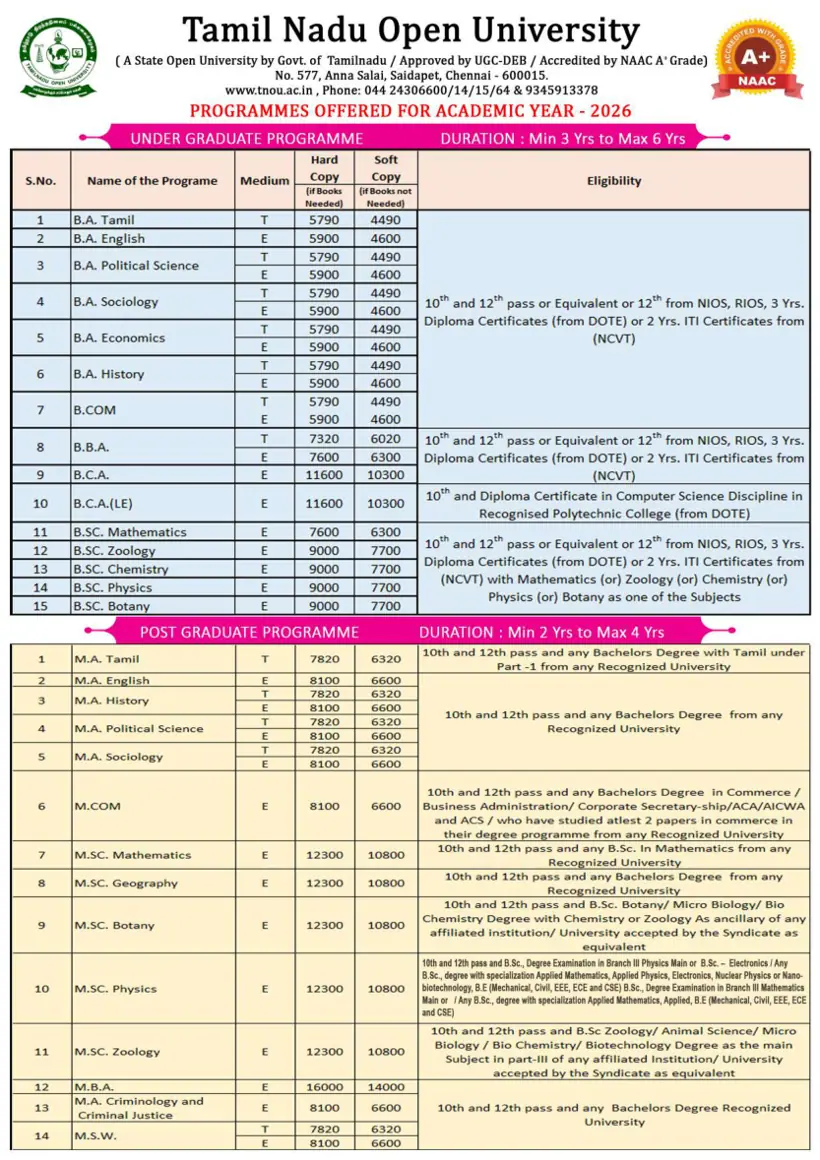
You can find the fee structure for TNOU programmes within the official prospectus documents available on tnou.ac.in. Navigate to the “Prospectus and Fee Structure” section on the main website. Select and download the prospectus for your desired session, such as PROSPECTUS-(AY 2026-27) or CY 2027 B.Ed. Special Education. The downloaded PDF will contain comprehensive details regarding programme fees and related charges.
More on Admission
- TNOU Application Status 2026-27 and Online Admission Details
- TNOU Admission 2026: Online Portal, Course Eligibility and Fee Structure
- TNOU Admission Last Date 2026: July and January Session Deadlines
- TNOU Fees Payment, AY 2026-27 Fee Structure, and Portal
- TNOU PG Fee Structure 2026-27: Prospectus and Payment Process
- TNOU portal exam fees online payment and login steps
TNOU Prospectus official links and PDFs
- Guidelines for Online Assignment PDF — Guidelines for online assignment downloading and PDF upload procedures