
TNOU Application Status 2026: Enrolment and Admission Check
Part of TNOU Admission: TNOU Admission 2026: Online Portal, Course Eligibility and Fee Structure
Quick reference
| AY 2026-27 Admission Status | Closed (Extended deadline was 13.10.2026) |
|---|---|
| Official Student e-Portal | tnouportal.in |
| Default Login Password Format | Date of Birth (DDMMYYYY) |
| Admission Help Desk WhatsApp | 9345913378 |
| Admission Contact Email | admission@tnou.ac.in |
| University Helpline Number | 044-24306600 |
TNOU provides online enrolment status and application verification through its official student e-portal. Admissions for Academic Year 2026-27 closed on 13 October 2026. Enrolled students must log into the e-portal using their enrolment number and date of birth to access their academic status.
- TNOU online admissions for Academic Year 2026-27 closed on 13 October 2026.
- Student e-portal login requires your enrolment number as User ID and date of birth (DDMMYYYY) as password.
- Candidates can resolve e-portal login issues via WhatsApp at 9345913378 or admission@tnou.ac.in.
- TNOU processes fee refunds for cancelled admissions under a five-tier UGC system subject to a 5% processing fee deduction.
Tamil Nadu Open University, also known as TNOU, processes online learner registrations and enrolment status updates through its official e-portal. Candidates applying for undergraduate, postgraduate, diploma, and certificate programmes for Academic Year 2026-27 can track their admission progress online using their assigned credentials. The university has concluded online admission for AY 2026-27 following the extended deadline of 13 October 2026. Learners can log into the student portal using their enrolment number and date of birth to check application processing, change passwords, and complete second or third-year re-registrations.
TNOU Admission Portal 2026: Academic Year 2026-27 Notice
Tamil Nadu Open University officially closed online admissions for the Academic Year 2026-27 after extending the deadline to 13 October 2026. Candidates seeking admission were required to submit their forms strictly through the official university portal.
Applicants who submitted forms before the deadline can check their enrolment status by accessing the portal. TNOU has notified candidates to monitor the TNOU Learner’s Corner for ongoing academic schedules and admission verification updates.

TNOU Application Status 2026: Key Portal Highlights
TNOU manages all student enrolments, admission updates, and fee status checks through its central electronic portal. Students must verify their credentials on the TNOU e-portal login page to confirm active enrolment.
TNOU Online Admission and Enrolment Check Highlights
| Feature / Service | Official Details / Credentials | Portal Link / Contact |
|---|---|---|
| Admission Status AY 2026-27 | Closed on 13 October 2026 | TNOU online admission portal |
| Student Login User ID | Assigned Enrolment Number | TNOU e-portal login page |
| Default Password Format | Date of Birth in DDMMYYYY format | TNOU e-portal login PDF |
| Support WhatsApp Number | 9345913378 | TNOU password recovery page |
| Support Email Address | admission@tnou.ac.in | TNOU Help Desk portal |
TNOU e-Portal Login: Steps for Checking Enrolment Status
Tamil Nadu Open University requires learners to sign into the e-portal to check their official enrolment profile and academic records. Students must use their date of birth in DDMMYYYY format for initial access as specified in the TNOU e-portal login PDF.
- Open the official TNOU e-portal login page on your web browser.
- Select your portal role as ‘Student’ on the login screen.
- Enter your assigned TNOU enrolment number in the ‘User Id’ field.
- Enter your date of birth in DDMMYYYY format as your default password (e.g., 28081992 for 28 August 1992).
- Click the ‘Submit’ button to access your personal dashboard and review your enrolment status.
- Navigate to the ‘Change Password’ option on the left menu bar after your initial login to set a new password.
More from TNOU
TNOU Admission Registration: Required Verification Documents
TNOU mandates specific digital and physical documents during the online application and verification process. Candidates must submit valid certificates as detailed in the TNOU admission procedure page.
- Valid personal email ID and active mobile number.
- Credit card, debit card, or internet banking details for fee payment.
- JPEG file of the highest qualification certificate (10th, 12th, Degree, or Diploma).
- Community certificate for applicants claiming reservation or government scholarships.
- Scanned copy of recent passport-size colour photograph.
- Scanned copy of the applicant’s signature.
TNOU Admission Cancellation: UGC Fee Refund Policy Rules
Tamil Nadu Open University enforces a five-tier fee refund policy starting from Academic Year 2025-26 in compliance with UGC guidelines. All approved refund calculations incur a deduction of 5% as processing charges from the total fee collected.
TNOU Five-Tier Admission Fee Refund Structure
| S.No. | Refund Percentage | Time of Withdrawal Notice Receipt |
|---|---|---|
| 1 | 100% | 15 days or more before the formally notified last date of admission |
| 2 | 90% | Less than 15 days before the formally notified last date of admission |
| 3 | 80% | 15 days or less after the formally notified last date of admission |
| 4 | 50% | 30 days or less, but more than 15 days, after the formally notified last date |
| 5 | 0% | More than 30 days after the formally notified last date of admission |

TNOU Login Support: Troubleshooting Password and Access Issues
Candidates experiencing login failures or credential errors on the student e-portal can request password recovery online. Students must visit the TNOU password recovery page to reset credentials.
- Click on ‘To get New Password / Forgot Password ? Click Here’ on the login screen.
- Contact TNOU support via WhatsApp at 9345913378 if login issues persist.
- Send an email specifying your enrolment details to admission@tnou.ac.in.
- Call the general university helpline at 044-24306600 for technical assistance.
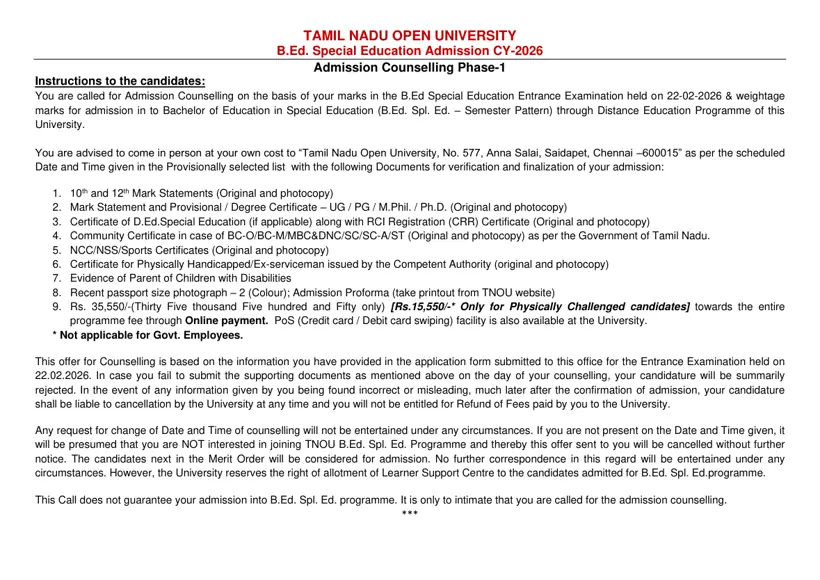
TNOU Special Education Admission: Counselling Verification Documents
Candidates selected for B.Ed. Special Education programmes must present original certificates during physical admission counselling. The requirements are outlined in the TNOU B.Ed Spl Ed counselling PDF.
- 10th and 12th mark statements (original and photocopy).
- Undergraduate or Postgraduate mark statements and provisional/degree certificates.
- D.Ed. Special Education certificate and RCI Registration (CRR) certificate, if applicable.
- Community certificate for BC-O, BC-M, MBC&DNC, SC, SC-A, and ST candidates.
- NCC, NSS, or Sports certificates (original and photocopy).
- Certificate for Physically Handicapped or Ex-serviceman status from competent authority.
- Evidence of being a parent of children with disabilities, if applicable.
- Two recent passport-size colour photographs and the printed Admission Proforma.
- Admission fee payment of Rs. 35,550.
TNOU Enrolment Verification 2026: Next Steps for Candidates
Students must immediately check their login credentials on the e-portal to ensure their registration for the current session is active. Candidates needing portal assistance should reach out to the university support desk at 044-24306600.
Important TNOU links
| What you can do | Official page |
|---|---|
| Check online admission status for current session | tnouportal.in ↗ |
| Login to TNOU student e-portal | tnouportal.in ↗ |
| Access TNOU Learner Corner updates | tnou.ac.in ↗ |
| View TNOU online admission procedure guidelines | tnou.ac.in ↗ |
| Reset forgotten password on student e-portal | tnouportal.in ↗ |
| Contact TNOU support and help desk | tnou.ac.in ↗ |
What students ask about TNOU Application Status
How can I check my TNOU admission status online?
You can check your TNOU admission status online through the official student e-portal at tnouportal.in. Select the role as ‘Student’ on the login screen, enter your assigned enrolment number as the User ID, and type your date of birth in DDMMYYYY format as the default password. Click the ‘Submit’ button to access your personal dashboard, where your profile displays your active enrolment and academic records for the session. If you encounter access issues, click the forgot password link or contact support via WhatsApp at 9345913378.
What is the default password for the TNOU student e-portal?
The default password for the TNOU student e-portal at tnouportal.in is your date of birth in DDMMYYYY format. For example, an applicant born on 28 August 1992 must enter 28081992 alongside their assigned enrolment number. After logging into the student portal, navigate to the left menu bar and select the ‘Change Password’ option to set a personalized password. If the default login fails, click ‘To get New Password / Forgot Password ? Click Here’ or email admission@tnou.ac.in.
What was the last date for TNOU AY 2026-27 online admission?
The extended last date for online admission to undergraduate and postgraduate programmes at TNOU for Academic Year 2026-27 was 13 October 2026. Online registration on the portal at tnouportal.in is now officially closed for the AY 2026-27 session. Submitted applicants can log into the e-portal using their enrolment number to verify their profile and check academic updates. If your application was missed, monitor the university portal at tnou.ac.in for upcoming admission notices or call 044-24306600.
What should I do if I cannot log into the TNOU e-portal?
You should use the password recovery feature on the TNOU student e-portal screen to reset your login credentials. Visit tnouportal.in, click ‘To get New Password / Forgot Password ? Click Here’, and submit your registered details. If technical errors persist, contact the TNOU admission support desk via WhatsApp at 9345913378 or send an email to admission@tnou.ac.in. You can also call the general university helpline at 044-24306600 for technical guidance regarding your enrolment account.
How much fee is refunded if I cancel my TNOU admission?
TNOU refunds 100% of fees if the withdrawal notice is received 15 days or more before the notified last date, 90% if less than 15 days before, 80% within 15 days after, and 50% between 15 and 30 days after the last date. A 5% processing charge is deducted in all cases.
What documents are required for TNOU B.Ed Special Education counselling?
Candidates attending physical counselling for TNOU B.Ed Special Education must present original and photocopies of 10th, 12th, and UG/PG degree mark statements. You must also submit D.Ed. Special Education and RCI registration certificates if applicable, community certificate, disability/ex-serviceman proof, and NCC/NSS/sports certificates. Bring two recent colour passport-size photographs, the printed Admission Proforma from tnou.ac.in, and the admission fee of Rs. 35,550 to TNOU Saidapet, Chennai. Failure to present the mandatory original certificates during verification will result in the cancellation of your provisional selection.
What digital files and documents are required to complete online admission for TNOU programmes?
Applicants must upload JPEG files of their highest qualification certificate (10th, 12th, degree, or diploma), community certificate for scholarship claims, a recent colour passport photo, and scanned signature. Candidates also need a valid email ID, active mobile number, and online payment facilities such as a credit card, debit card, or internet banking. Access www.tnou.ac.in, click ‘ONLINE ADMISSION’, and select ‘NEW REGISTRATION’ to complete the student details. If document uploading fails, verify that file formats match the required JPEG format before resubmitting.
How can existing students pay their TNOU 2nd year and 3rd year re-registration fees online?
Existing students can pay their second and third-year re-registration fees through the dedicated re-registration portal link on the official TNOU website at tnou.ac.in. For UG programmes like B.A. English, the second and third-year tuition fee is Rs. 3,600 per year, which includes Rs. 300 processing charges and Rs. 300 ICT charges. Visit tnou.ac.in, click on ‘Re registration portal for the 2nd year & 3rd year fees Payment’, and enter your enrolment number to submit payment. If fee receipt generation fails after payment, contact student support at 044-24306600 or email admission@tnou.ac.in.
What additional registration and processing charges are included in TNOU first-year UG fees?
TNOU includes a registration fee of Rs. 300, postal and ICT processing charges of Rs. 500, and alumni charges of Rs. 500 in the total first-year UG fee structure. For instance, the total first-year fee for semester-based B.A. programmes is Rs. 4,300, while B.C.A. Year-I fee is Rs. 10,300. Students can verify full fee breakdowns by reviewing the official programme prospectus on tnou.ac.in prior to making payments. If any fee payment discrepancies occur on your invoice, submit a ticket via the TNOU student grievance portal.
What is the TNOU fee refund policy if an admission cancellation notice is submitted after the notified deadline?
TNOU refunds 80% of fees if withdrawal is submitted 15 days or less after the notified last date, and 50% if submitted between 15 and 30 days after the deadline. No fee refund (0%) is granted if the withdrawal application is received more than 30 days after the formally notified admission deadline. In all approved refund cases under the UGC five-tier system, a deduction of 5% of the total collected fee is made as processing charges. Learners must submit a formal withdrawal request to TNOU administration before the 30-day cutoff to receive eligible funds.
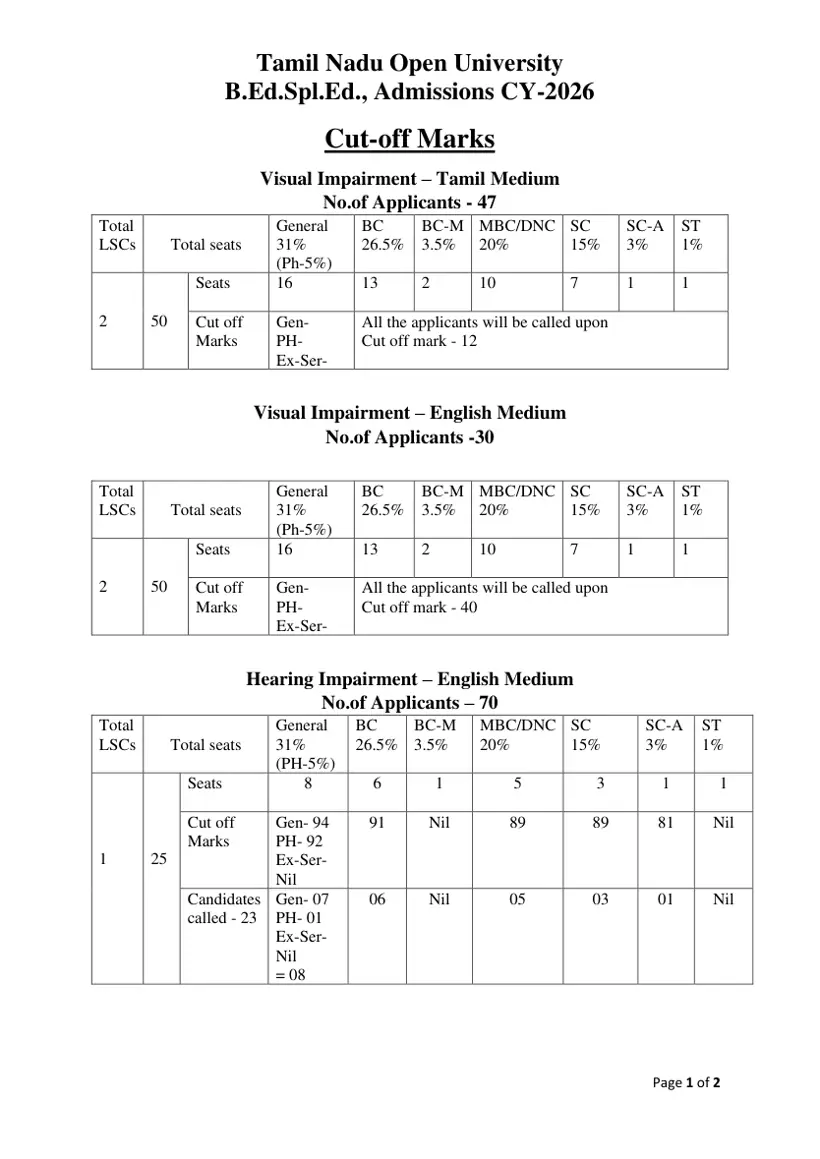
What were the CY-2026 entrance cut-off marks for TNOU B.Ed Special Education Hearing Impairment programme?
The TNOU CY-2026 entrance exam cut-off mark for B.Ed. Special Education Hearing Impairment (Tamil Medium) General category was 95, with PH cut-off at 90. For Hearing Impairment (English Medium), the General category cut-off was 94, BC was 91, MBC/DNC was 89, and SC was 89. Selected candidates were called to attend Phase-1 admission counselling at TNOU Campus in Saidapet, Chennai. Candidates who missed the counselling schedule can check tnou.ac.in for future session entrance notifications and seat allotment lists.
More on Admission
- TNOU Application Status 2026-27 and Online Admission Details
- TNOU Admission 2026: Online Portal, Course Eligibility and Fee Structure
- TNOU Prospectus 2026-27: PDF Download and Session Archives
- TNOU Admission Last Date 2026: July and January Session Deadlines
- TNOU Fees Payment, AY 2026-27 Fee Structure, and Portal
- TNOU PG Fee Structure 2026-27: Prospectus and Payment Process
TNOU Application Status official links and PDFs
- Instructions for TNOU e-Portal Login Process PDF — Instructions for TNOU e-portal student login process
- TNOU Fee Refund Policy Academic Year 2025-26 PDF — TNOU fee refund policy and UGC withdrawal rules
- TNOU B.Ed Special Education Admission Counselling Instructions 2026 PDF — TNOU B.Ed Special Education admission counselling instructions and proforma